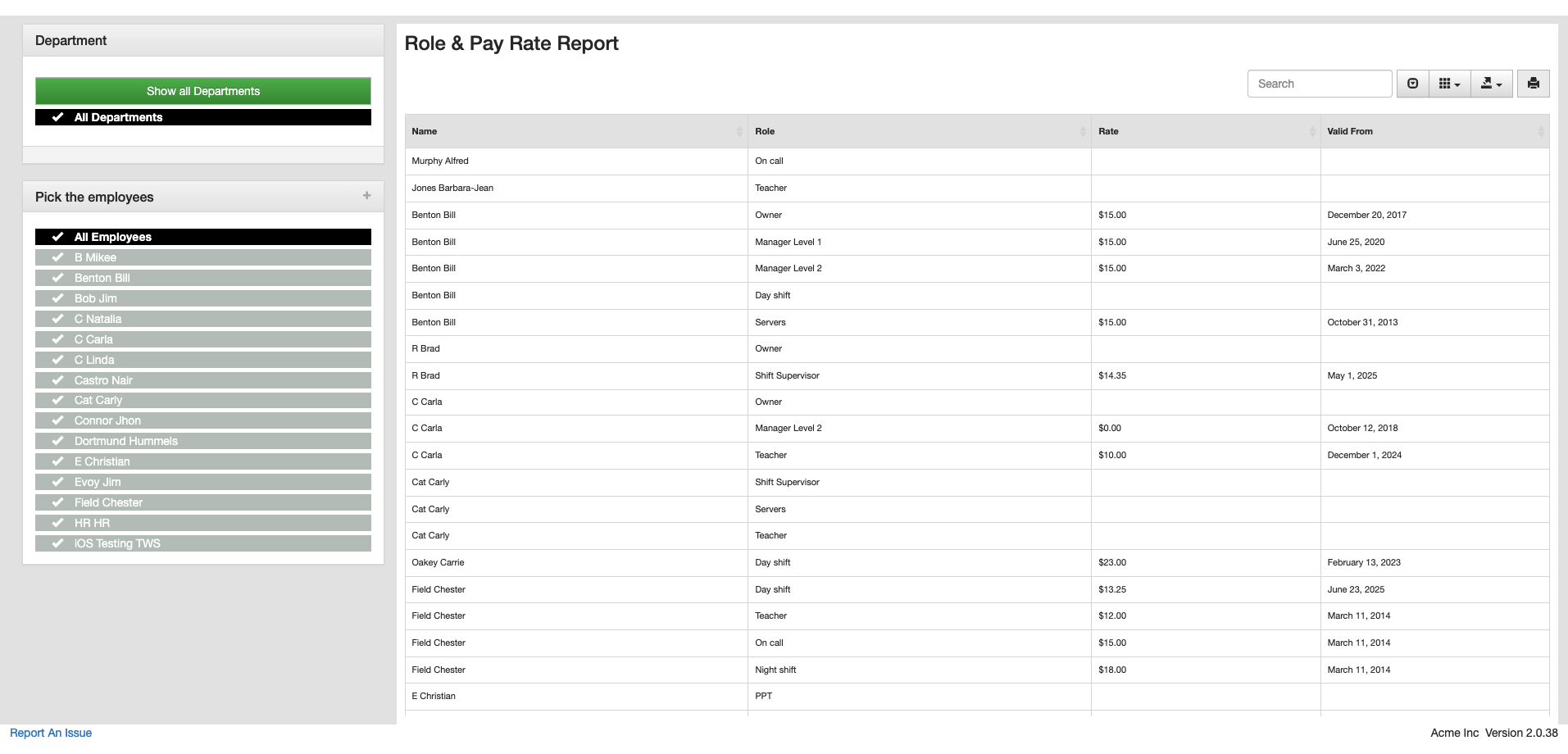
New – Role & Pay Rate Report
|
We’ve realeased a new report that shows all employees in their role and pay rate for that role.
Located under REPORTS
|
How to create a banked hours type
|
To create a new banked hour type:
1. Go to MANAGE MY BUSINESS
2. Go to MANAGED BANKED HOURS & EARNED HOURS TYPES
3 .Click ADD NEW TYPE
4. Enter the name and default values, click ADD
|
|
How do see how many absences an employee has taken?
|
If you’re using the HR Suite, you can check employee totals this way.
If not, you can follow these steps to see the absence counts taken:
1. Go to REPORTS
2. Go to ABSENCE REPORTS
3. Go to ABSENCE REPORT BY HOURS, click GO
4. Change the date range to match the period you’re looking to report on
|
|
|
Retail is Detail: What Does It Mean? Why Does it Matter?
|
In the retail world, success is rarely accidental. It depends on systems, habits, and standards rooted in consistent attention to detail. Whether it’s product placement, staffing, store cleanliness, or checkout efficiency, small oversights can quickly escalate into…
|
|
Tackle Common Health & Safety Hazards in Retail
|
Retail operations routinely face safety risks such as overexertion injuries, slips, and falls during routine tasks. Ignoring these issues can lead to accidents, fines, and damage to the employer’s reputation. This article outlines data-driven best practices, safety…
|
|
|
Startup Guide – Managers:
|
FREE PDF DOWNLOAD with a selection of articles to get you started with TimeWellScheduled.
|
|
TimeWellScheduled offers a suite of HR Suite, designed as an add-on to the base TimeWellScheduled service. These Suite provide advanced capabilities to manage various aspects of human resources effectively.
|
|
|
Want your next month free?
|
|
We want to hear from you – please take a minute to complete a review.
Click here to leave a review
Each month we will pick a client and provide a month of service at no cost. Leave multiple reviews and increase your chances. Make sure to leave your name / company so we can track you.
|
|
|
Thank you Alyssa for your comments:
“Easy program to use, support is amazing!”
|
|