
TimeWellScheduled API Documentation
GETTING STARTED
The TimeWellScheduled API does not rely on different HTTP request methods (GET/PUT/INSERT/DELETE). Instead, we use only GET HTTP Requests over HTTP and simply pass the desired method along with the variables for the request itself in a standard, well-formatted URL.
This has a number of advantages when working with our API as:
- There is no need to switch between different HTTP request modes in your application
- You can convert your data straight to a URL formatted text in whatever language you are using
- Our ‘Method’ names are a bit more intuitive
REGISTER
We handle all registrations internally. To get started please provide us with:
- Application Description – How you plan on using our API.
- Compliance with our Terms – Acknowledgement that you have read and agree to our API.
- E-Mail – Send this information to us via e-mail at: [email protected]
Upon receiving this information, we will setup an Application ID for you that can be used in the development of your application.
BCRYPT ENCRYPTION
TimeWellScheduled uses bCrypt to store all passwords and provides you with employee passwords in this encrypted format. Your application will need to verify passwords with these bCrypt hashes, meaning you will need to bCrypt-hash these on the client-side. To get comparable results, you will need the bCrypt Salt which is unique to each company; we will pass you this information when your application authenticates for the first time.
For more information about bCrypt, and links to the various implementations (including Objective-C, PHP, Python, Perl, .NET, Ruby, and even JavaScript!), please visit: https://codahale.com/how-to-safely-store-a-password/
The staff at TimeWellScheduled strongly believe in the power of bCrypt, and our clients trust in our choice of using this algorithm to prevent reverse-engineering of hashes, and prevent man-in-the-middle attacks of clear-text passwords being transmitted across the network. If bCrypt implementation proves to be difficult, we’re more than happy to help
REQUESTS
All requests must be packaged as an encoded URL String and appended to the API URL in a well-formed GET HTTPS Request Method.
The API URL is located at
- for XML calls – https://api.timewellscheduled.com/response.asp
- for JSON calls – https://api.timewellscheduled.com/response_json.asp
All requests require mandatory parameters:
- Application ID [appid] – provided by us
- Company ID [c] – your unique company
- Module [module] – the module being called
RESPONSES
Upon your application sending a properly-formed request, the server will return an XML. An example:
<?xml version=”1.0”?>
<response>
<success>1</success>
<ontime>1</ontime>
<message>Your action has been recorded successfully</message>
</response>
File Attachment
Used for the following modules: begin, end, break or meal.
This in an optional parameter used to send a photo when the employee is punching in. The file must be uploaded to our S3 repository (ask for details) and the filename needs to be sent as a parameter.
The request should look like below (explained below for each action as well):
/?appid={App ID}&c={Company ID}&module=begin&u={employee code}&p={password}&Year
=2018&Month=6&Day=10& Hour=12&Minute=0&Second=2&file=
13222F23-C76A-7781-0C12-0293E3B34398.jpg
Geo Location
Used for the following modules: begin, end, break or meal.
This in an optional parameter used to send the latitude and longitude at the time of the punch.
The request should look like below (explained below for each action as well):
/?appid={App ID}&c={Company ID}&module=begin&u={employee
code}&p={password}&Year=2018&Month=6&Day=10&
Hour=12&Minute=0&Second=2 &lat=43.697772&lng=-115.685849
Access Restrictions
Used for the following modules: begin, end, break or meal.
All punch actions can be locked by an IP address or cookie. Cookie support is only used with a browser. If the company is setup to use IP and the calling location is not a registered IP, you will receive the following response:
<?xml version=”1.0”?>
<response>
  <success>0</success>
  <ontime>0</ontime>
  <message>
     Failure to authenticate. Password to access the application is incorrect Or IP is not Valid - 200.58.74.137
  </message>
</response>
In some cases, the calling location can not be from a registered IP – an example would be a mobile user. In this case, the password of an administrator needs to be passed into the query. This allows the system to authenticate the mobile user is valid.
/?appid={App ID}&c={Company ID}&module=begin&u={employee code}&p=
{passowrd}&Year=2018&Month=6&Day=10& Hour=12&Minute=0&Second=
2&pws={password of an administrator}
SSO (SINGLE SIGN ON)
SSO (Single Sign On) allows your users to connect directly to our system without having to log in
again. The URL to connect to will be based on your client’s data center (ie. CA, US, etc) – please
contact us to confirm.
As an example, you may have: https://my.timewellscheduled.com/authenticate.asp
You must pass in the following attributes
- appID – provided to you by us
- c – unique company ID for each client site
- userEmail – the email of the user
- Year – Current year
- Month – Current month
- Day – Current day
- Hour – Current hour
- Minute – Current minute
- Hash (MD5 of ‘CompanyID + userEmail + APIkey + year + month + day + hour + minute’)
A complete request will look like this:
https://my.timewellscheduled.com/authenticate.asp?appid={App ID}&c={Company ID}&userEmail={email}&Hash={Hash}
schedule_count
Retrieve a count of employees working for each hour of the day.
Method=POST
| Parameters | Notes | Returns |
|
|
|
Example request:
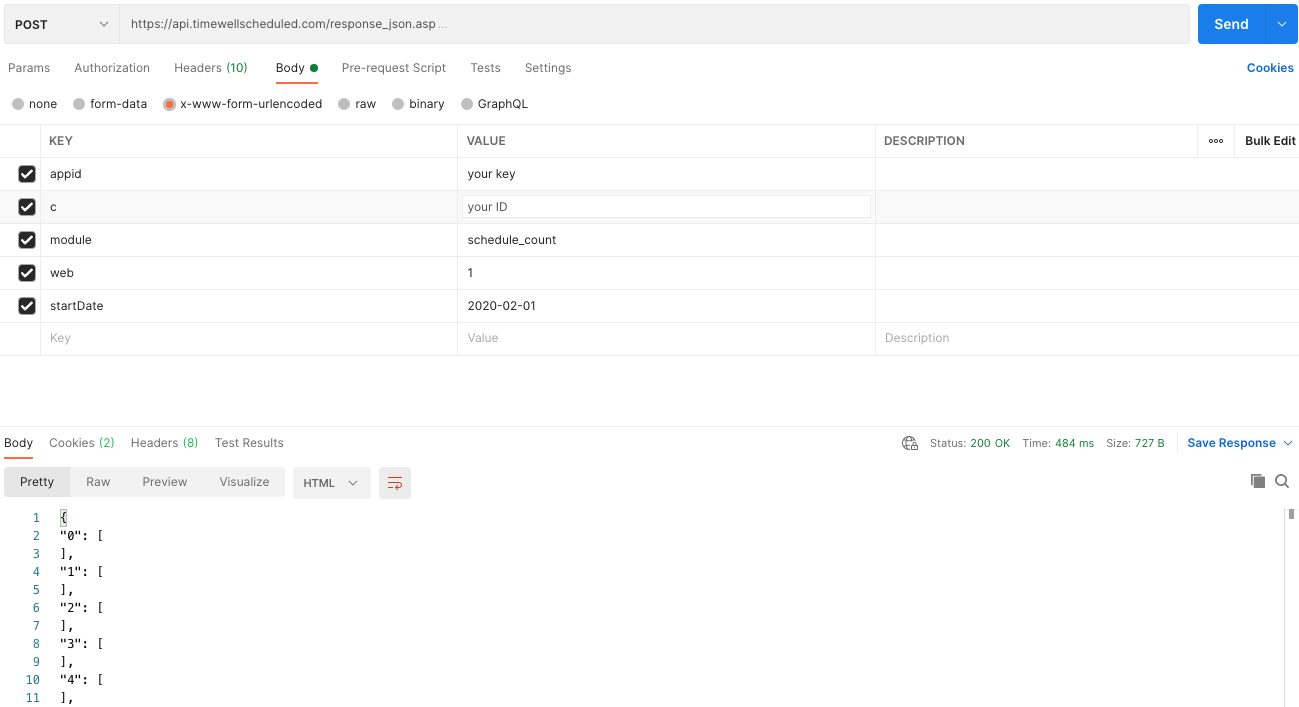
Example response:
{
"07":[
	{
            "department": "Cash",
            "employee": 10
        },
        {
            "department": "Customer Service",
            "employee": 3
        },
     ],
"08":[
        {
            "department": "Cash",
            "employee": 20
        },
        {
            "department": "Customer Service",
            "employee": 10
        },
        {
           "department": "Hardware",
           "employee": 5
        },
     ],
...
"18":[
        {
           "department": "Cash",
           "employee": 20
        },
        {
           "department": "Customer Service",
           "employee": 10
        },
        {
           "department": "Hardware",
           "employee": 5
        },
     ]
}
verify
To retrieve your company´s information.
| Parameters | Notes | Returns |
|
|
|
Example request:
/?appid={App ID}&c={Company ID}&module=verify
Example response:
<?xml version=”1.0”?>
<response>
<success>1</success>
<ontime>1</ontime>
<message>
	<employees>
		<employee>
		<name>Bob Robertson</name>
		<id>12345</id>
		</employee>
		<employee>
		<name>Jane Johnson</name>
		<id>abc123</id>
		</employee>
		<employee>
		<name>Bill Smith</name>
		<id>995jk</id>
		</employee>
	</employees>
	<branding logo="https://url_to_logo/MainLogo.png">Your Company Here</branding>
	<bcryptSalt>yourKey</bcryptSalt>
</message>
</response>
begin
| Parameters | Notes | Returns |
Optional
|
|
Example request:
/?appid={App ID }&c={Company ID}&module=begin&u={employee code}&p=
{password}&Year=2018&Month=4&Day=22&Hour=16&Minute=0&Second=34
Example response:
<?xml version=”1.0”?>
<response>
	<success>1</success>
	<ontime>1</ontime>
	<message>Your action has been recorded successfully. You have 12 unread message(s) in your Inbox.</message>
</response>
end
To record an employee´s end of shift.
| Parameters | Notes | Returns |
Optional
|
|
|
Example request: when is too early to leave.
/?appid={App ID }&c={Company ID}&module=end&u={employee code}&p=
{password}&Year=2018&Month=4&Day=22&Hour=19&Minute=05&Second=25
Example response:
<?xml version=”1.0”?>
<response>
	<success>0</success>
	<ontime>0</ontime>
	<message>It is too early for you to EXIT</message>
	<watchdog>
		<message>Select a reason.</message>
		<reasons>
			<reason ID="2233">Accident de route</reason>
			<reason ID="153">Car problems</reason>
			<reason ID="157">Computer issues</reason>
			<reason ID="1482">Default reason code</reason>
			<reason ID="159">Finished early</reason>
			<reason ID="154">Not feeling well</reason>
			<reason ID="156">Other (Please explain)</reason>
			<reason ID="1983">Personal emergency</reason>
			<reason ID="2231">Rendez-vous chez le medecin</reason>
			<reason ID="158">Traffic</reason>
		</reasons>
	</watchdog>
</response>
Since the request was not successful and a watchdog event was triggered. We need to send the same request again with the extra parameter REASON ID enclosed in the
Example request:
/?appid={App ID }&c={Company ID}&module=end&u={employee code}&p=
{password}&Year=2018&Month=4&Day=22&Hour=19&Minute=05&Second=25&reason={reason ID}
Example response:
<?xml version=”1.0”?>
<response>
	<success>1</success>
	<ontime>1</ontime>
	<message>Your action has been recorded successfully.</message>
</response>
break
Records beginning or end of an employee´s break.
| Parameters | Notes | Returns |
Optional
|
|
|
Example request: Break (begin) when going out for a break.
/?appid={App ID}&c={Company ID}&module=break&u={employee code}&p={password}&Year=2018&Month=4&Day=22&Hour=18&Minute=15&Second=09
Example Response:
<?xml version=”1.0”?>
<response>
  <success>1</success>
  <ontime>1</ontime>
  <message>Have a great break. You need to be back in 15 minutes. That means punch back by 18:30 PM</message>
</response>
The response was successful.
Example request: Break (end) when getting back late from a break.
/?appid={App ID}&c={Company ID}&module=break&u={employee code}&p={employee code}&Year=2018&Month=4&Day=22&Hour=18&Minute=58&Second=09
Example response:
<?xml version=”1.0”?>
<response>
  <success>0</success>
  <ontime>0</ontime>
  <message>You are 15 minutes late</message>
  <watchdog>
    <message>Select a reason.</message>
    <reasons>
      <reason ID="2233">Accident de route</reason>
      <reason ID="153">Car problems</reason>
      <reason ID="157">Computer issues</reason>
      <reason ID="1482">Default reason code</reason>
      <reason ID="159">Finished early</reason>
      <reason ID="154">Not feeling well</reason>
      <reason ID="156">Other (Please explain)</reason>
      <reason ID="1983">Personal emergency</reason>
      <reason ID="2231">Rendez-vous chez le medecin</reason>
      <reason ID="158">Traffic</reason>
      <reason ID="155">Weather</reason>
     </reasons>
   </watchdog>
</response>
Since the request was not successful and a watchdog event was triggered. We need to send the same request again with the extra parameter REASON ID enclosed in the <watchdog> tag.
Example request:
/?appid={App ID}&c={Company ID}&module=break&u={employee code}&p={password}&Year=2018&Month=4&Day=22&Hour=18&Minute=58&Second=09&reason={reason ID}
Example response:
<?xml version=”1.0”?> <response> <success>1</success> <ontime>1</ontime> <message>Your action has been recorded successfully.</message> </response>
meal
Records beginning or ending of employee´s meal.
| Parameters | Notes | Returns |
Optional
|
|
|
Example request: When the shift length doesn´t allow to take Meals.
/?appid={App  ID}&c={Company  ID}&module=meal&u={employee code}&p=
{password}&Year=2018&Month=4&Day=22&Hour=19&Minute=05&Second=15
Example response:
<?xml version=”1.0”?>
<response>
	<success>0</success>
	<ontime>0</ontime>
	<message>This action cannot be done. Your schedule does not allow any MEALS</message>
</response>
schedule_list
Retrieve a list of active schedules for the given employee in a period of time.
| Parameters | Notes | Returns |
|
|
|
Example request:
/?appid={App ID}&c={Company ID}&module=schedule_list&u=
{employee code}&StartDate=2018-06-01&EndDate=2018-06-30
Example response:
<?xml version=”1.0”?>
<response>
   <success>1</success>
   <ontime>1</ontime>
   <schedules>
    <schedule date="2016-6-1">
      <time>7:00 AM-2:00 PM</time>
      <type>Regular Hours</type>
      <deptName>Office</deptName>
      <roleBelong>Cash Balancing</roleBelong>
      <comment></comment>
    </schedule>
    <schedule date="2016-6-2">
      <time>7:00 AM-2:00 PM</time>
      <type>Regular Hours</type>
      <deptName>Office</deptName>
      <roleBelong>Cash Balancing</roleBelong>
      <comment></comment>
    </schedule>
  </schedules>
</response>
role_list
Retrieve a list of all active roles in the company.
| Parameters | Notes | Returns |
|
|
Example request:
/?appid={App ID}&c={Company ID}&module=role_list
Response:
<?xml version=”1.0”?>
<response>
<success>1</success>
<ontime>1</ontime>
<roles>
<role roleID="15">
  <roleName>Business Owner</roleName>
  <roleLevel>1</roleLevel>
</role>
<role roleID="2">
  <roleName>Store Manager</roleName>
  <roleLevel>2</roleLevel>
</role>
</roles>
</response>
status_list
Retrieve a list of all active status in the company.
| Parameters | Notes | Returns |
|
|
Example request:
/?appid={App ID}&c={Company ID}&module=status_list
Response:
<?xml version=”1.0”?>
<response>
	<success>1</success>
	<ontime>1</ontime>
	<statuses>
		<status statusID="73">
			<statusName>Active</statusName>
			<canLogin>True</canLogin>
		</status>
		<status statusID="78">
			<statusName>Leave Of Absence</statusName>
			<canLogin>False</canLogin>
		</status>
		<status statusID="75">
			<statusName>Long Term Disability</statusName>
			<canLogin>False</canLogin>
		</status>
		<status statusID="76">
			<statusName>Maternity Leave</statusName>
			<canLogin>False</canLogin>
		</status>
		<status statusID="1301">
			<statusName>Quit</statusName>
			<canLogin>False</canLogin>
		</status>
		<status statusID="77">
			<statusName>Short Term Disability</statusName>
			<canLogin>False</canLogin>
		</status>
		<status statusID="1277">
			<statusName>Terminated</statusName>
			<canLogin>False</canLogin>
		</status>
	</statuses>
</response>
department_list
Retrieve a list of all active departments in the company.
| Parameters | Notes | Returns |
|
|
Example request:
/?appid={APP_ID}&c={COMPANY_ID}&module=department_list
Example response:
<?xml version=”1.0”?>
<response>
  <success>1</success>
  <ontime>1</ontime>
  <departments>
    <department departmentID="2002">
      <departmentName>Adjusting</departmentName>
      <departmentCode>18</departmentCode>
      <departmentCodePrefix></departmentCodePrefix>
      <departmentCodeSuffix></departmentCodeSuffix>
    </department>
    <department departmentID="1">
      <departmentName>Automotive Parts</departmentName>
      <departmentCode>2</departmentCode>
      <departmentCodePrefix></departmentCodePrefix>
      <departmentCodeSuffix></departmentCodeSuffix>
    </department>
  </departments>
</response>
employee_list
Retrieve a list of all active employees in the company.
| Parameters | Notes | Returns |
|
|
|
Example request:
/?appid={App ID}&c={Company ID}&module=employee_list
Example response:
<?xml version=”1.0”?>
<response>
  <success>1</success>
  <ontime>1</ontime>
  <employees>
    <employee>
      <name>Abed</name>
      <lastName>Mart</lastName>
      <employeeCode>394</employeeCode>
      <payrollType>Hourly</payrollType>
      <internalStatusName>No longer employed</internalStatusName>
      <street>119 Moore Avenue</street>
      <postalCode>N5H 2Z8</postalCode>
      <birthday>1995-02-08</birthday>
      <hireDate>2013-03-25</hireDate>
      <terminationDate></terminationDate>
      <phone1>000-000-0000</phone1>
      <phone2>000-000-0000</phone2>
    </employee>
    <employee>
      <name>Adam</name>
      <lastName>Thomson</lastName>
      <employeeCode>371</employeeCode>
      <payrollType>Hourly</payrollType>
      <internalStatusName>No longer employed</internalStatusName>
      <street>49300 Lyons Line, RR #2</street>
      <postalCode>N0L 2J0</postalCode>
      <birthday>1994-02-22</birthday>
      <hireDate>2011-03-02</hireDate>
      <terminationDate>2015-08-28 5:37:49 PM</terminationDate>
      <phone1>000-000-0000</phone1>
      <phone2>000-000-0000</phone2>
    </employee>
  </employees>
</response>
employee_details
Retrieve the details for the given employee.
| Parameters | Notes | Returns |
|
|
Example request:
/?appid={App ID}&c={Company ID}&module=employee_details&u={employee code}
Example response:
<?xml version=”1.0”?>
<response>
  <success>1</success>
  <ontime>1</ontime>
  <employee>
    <name>Maureen</name>
    <lastName>Martin</lastName>
    <employeeCode>2</employeeCode>
    <payrollType>Salaried</payrollType>
    <internalStatusName>Active</internalStatusName>
    <street>270 Caverly Road</street>
    <postalCode>N5H 2V3</postalCode>
    <birthday>2013-08-30</birthday>
    <hireDate>1988-08-10</hireDate>
    <terminationDate></terminationDate>
    <phone1>000-000-0000</phone1>
    <phone2></phone2>
  </employee>
</response>
employee_update
Update information for the given employee.
|
Notes | Returns |
|
|
|
Example request:
/?appid={App ID}&c={Company ID}&module=employee_update&u={employee code}&eRoleName=ManagerTest
<?xml version=”1.0”?>
  <response>
    <success>1</success>
    <ontime>1</ontime>
    <message>Your action has been recorded successfully</message>
  </response>
employee_status_change
Modify the status for the given employee.
|
Notes | Returns |
|
|
|
Example request:
/?appid={App ID}&c={Company ID}&module=employee_status_change&u={employee code}&statusID={status ID}
Example Response:
<?xml version=”1.0”?>
  <response>
    <success>1</success>
    <ontime>1</ontime>
    <message>Your action has been recorded successfully</message>
  </response>
message_list
Retrieve a list of unread messages for the given employee.
|
Notes | Returns |
|
|
Example request:
/?appid={App ID}&c={Company ID}&module=message_list&u={employee code}
Example Response:
<?xml version=”1.0”?>
  <response>
    <success>1</success>
    <ontime>1</ontime> <message>Your action has been recorded successfully</message>
  </response>
messages_mark_read
Mark a message as read.
|
Notes | Returns |
|
|
Example request:
/?appid={App ID}&c={Company ID}&module=messages_mark_read&MessageID={message ID}
Example Response:
<?xml version=”1.0”?>
  <response>
    <success>1</success>
    <ontime>1</ontime> <message>Your action has been recorded successfully</message>
  </response>
payroll_list
To get a list of all payroll details for a given period of time.
|
Notes | Returns |
|
|
|
Example request:
/?appid={App ID}&c={Company ID}&module=payroll_list&StartDate=2018-04-08&EndDate=2018-04-14
Example Response:
<?xml version=”1.0”?>
  <response>
    <success>1</success>
    <ontime>1</ontime>
    <payroll>
      <period>April 8, 2018-April 14, 2018</period>
      <employeeData> <employeeName>Anne robinson</employeeName>
      <employeeCode>2131</employeeCode>
      <primaryDepartment>Automotive Service</primaryDepartment>
      <totalRT>19</totalRT>
      <totalOT>0</totalOT>
      <totalDOT>0</totalDOT>
      <totalStatOT>0</totalStatOT>
      <totalShifts>4</totalShifts>
      <totalDays>4</totalDays>
      </employeeData> <employeeData>
      <employeeName>Sam Smith</employeeName>
      <employeeCode>8023</employeeCode>
      <primaryDepartment>Housewares</primaryDepartment>
      <totalRT>34.5</totalRT>
      <totalOT>0</totalOT>
      <totalDOT>0</totalDOT>
      <totalStatOT>0</totalStatOT>
      <totalShifts>4</totalShifts>
      <totalDays>4</totalDays>
      </employeeData>
    </payroll>
  </response>
absence_list
To get a list of all payroll details for a given period of time.
|
Notes | Returns |
|
|
Example request:
/?appid={App ID}&c={Company ID}&module=absence_list&startDate=2018-4-5&endDate=2018-4-15
Example Response:
<?xml version=”1.0”?>
<response>
<success>1</success>
<ontime>1</ontime>
<absences>
  <absence absenceID="738815">
    <employeeName>Chester field</employeeName>
    <employeeCode>abc123</employeeCode>
    <requestDateTime>2018-04-04 11:06:11 AM</requestDateTime>
    <requestFrom>2018-04-12</requestFrom>
    <requestTo>2018-04-12 11:59:59 PM</requestTo>
    <requestType>Family Emergency</requestType>
    <hours>7.5</hours>
    <comment>Test please ignore</comment>
    <status>Approved</status>
  </absence>
  <absence absenceID="738816">
    <employeeName>Christian P</employeeName>
    <employeeCode>xyz444</employeeCode>
    <requestDateTime>2018-04-04 11:07:15 AM</requestDateTime>
    <requestFrom>2018-04-12</requestFrom>
    <requestTo>2018-04-12 11:59:59 PM</requestTo>
    <requestType>Family Emergency</requestType>
    <hours>7.5</hours>
    <comment>Commets go here.</comment>
    <status>Approved</status>
  </absence>
</absences
</response>
absence_request_type_list
Retrieve a list of absence types in the company.
| Parameters | Notes | Returns |
|
|
Example request:
/?appid={App ID}&c={Company ID}&module=absence_request_type_list
Example Response:
<?xml version=”1.0”?>
<response>
<success>1</success>
<ontime>1</ontime>
<absenceRequestTypes>
  <absenceRequestType absenceRequestTypeID="71">
    <name>Family Emergency</name>
    <autoApproved>False</autoApproved>
  </absenceRequestType>
  <absenceRequestType absenceRequestTypeID="72">
    <name>Medical Appointment</name>
    <autoApproved>False</autoApproved>
  </absenceRequestType>
  <absenceRequestType absenceRequestTypeID="73">
    <name>Other</name>
    <autoApproved>False</autoApproved>
  </absenceRequestType>
  <absenceRequestType absenceRequestTypeID="1294">
    <name>Short Term Disability</name>
    <autoApproved>False</autoApproved>
  </absenceRequestType>
  <absenceRequestType absenceRequestTypeID="69">
    <name>Sick Day</name>
    <autoApproved>True</autoApproved>
  </absenceRequestType>
  <absenceRequestType absenceRequestTypeID="70">
    <name>Vacation Day</name>
    <autoApproved>False</autoApproved>
  </absenceRequestType>
</absenceRequestTypes>
</response>
To insert an absence for a given employee in a given date/time.
NotesReturns
- A list of absence types and the details of each
| Parameters |
|
Example request:
/?appid={App ID}&c={Company ID}&module=absence_insert&u={employee code}&absenceRequestTypeID=72&StartDate=2018-4-20&sHour=9&sMinute=0&eHour=16&eMinute=45&days=3
Example Response:
<?xml version=”1.0”?>
<response>
  <success>1</success>
  <ontime>1</ontime>
  <alert>1</alert>
  <message>Your action has been recorded successfully</message>
  <alertMessage>
     There is a schedule overlapping the request. Schedule for:[2018-04-20 9:00:00 AM]
     to [2018-04-20 5:00:00 PM] . The Absence request was inserted. There is a schedule
     overlapping the request. Schedule for:[2018-04-22 4:00:00 PM] to [2018-04-22 8:00:00 PM] .
     The Absence request was inserted.
  </alertMessage>
<absences>
  <absence absenceID="750125">
     <requestFrom>2018-04-20 9:00:00 AM</requestFrom>
     <requestTo>2018-04-20 4:45:00 PM</requestTo>
  </absence>
  <absence absenceID="750126">
    <requestFrom>2018-04-21 9:00:00 AM</requestFrom>
    <requestTo>2018-04-21 4:45:00 PM</requestTo>
  </absence>
  <absence absenceID="750127">
    <requestFrom>2018-04-22 9:00:00 AM</requestFrom>
    <requestTo>2018-04-22 4:45:00 PM</requestTo>
  </absence>
</absences>
</response>
MORE
Watchdog
Used for the following modules: begin, end, break or meal.
A watchdog event is used to insert additional information when a request was not successful. For example, if the employee is late the response will contain 0 within the <success> tag and will also contain a <watchdog> tag. The tag will list the available reasons the employee can be late. You must resend the initial request with a reason ID. An example of a failed ENTRY:
<?xml version=”1.0”?>
<response>
<success>0</success>
<ontime>0</ontime>
<message>You are 107 minutes late</message>
<watchdog>
  <message>Select a reason</message>
  <reasons>
    <reason ID="2233">Accident de route</reason>
    <reason ID="153">Car problems</reason>
    <reason ID="157">Computer issues</reason>
    <reason ID="1482">Default reason code</reason>
    <reason ID="159">Finished early</reason>
    <reason ID="154">Not feeling well</reason>
    <reason ID="156">Other (Please explain)</reason>
    <reason ID="1983">Personal emergency</reason>
    <reason ID="2231">Rendez-vous chez le medecin</reason>
    <reason ID="158">Traffic</reason>
    <reason ID="2232">Urgence</reason>
    <reason ID="155">Weather</reason>
   </reasons>
</watchdog>
</response>
Another request must be sent which includes the selected ‘reason’.
/?appid={App ID}&c={Company ID}&module=begin&u={employee code}&p=
{password}&Year=2018&Month=6&Day=10& Hour=12&Minute=0&Second=2&reason={reason ID}
The response then will be successful and on time.
File Attachment
Used for the following modules: begin, end, break or meal.
This in an optional parameter used to send a photo when the employee is punching in. The file must be uploaded to our S3 repository (ask for details) and the filename needs to be sent as a parameter.
The request should look like below (explained below for each action as well):
/?appid={App ID}&c={Company ID}&module=begin&u={employee code}&p={password}&Year
=2018&Month=6&Day=10& Hour=12&Minute=0&Second=2&file=
13222F23-C76A-7781-0C12-0293E3B34398.jpg
Geo Location
Used for the following modules: begin, end, break or meal.
This in an optional parameter used to send the latitude and longitude at the time of the punch.
The request should look like below (explained below for each action as well):
/?appid={App ID}&c={Company ID}&module=begin&u={employee
code}&p={password}&Year=2018&Month=6&Day=10&
Hour=12&Minute=0&Second=2 &lat=43.697772&lng=-115.685849
Access Restrictions
Used for the following modules: begin, end, break or meal.
All punch actions can be locked by an IP address or cookie. Cookie support is only used with a browser. If the company is setup to use IP and the calling location is not a registered IP, you will receive the following response:
<?xml version=”1.0”?>
<response>
  <success>0</success>
  <ontime>0</ontime>
  <message>
     Failure to authenticate. Password to access the application is incorrect Or IP is not Valid - 200.58.74.137
  </message>
</response>
In some cases, the calling location can not be from a registered IP – an example would be a mobile user. In this case, the password of an administrator needs to be passed into the query. This allows the system to authenticate the mobile user is valid.
/?appid={App ID}&c={Company ID}&module=begin&u={employee code}&p=
{passowrd}&Year=2018&Month=6&Day=10& Hour=12&Minute=0&Second=
2&pws={password of an administrator}
SSO (SINGLE SIGN ON)
SSO (Single Sign On) allows your users to connect directly to our system without having to log in
again. The URL to connect to will be based on your client’s data center (ie. CA, US, etc) – please
contact us to confirm.
As an example, you may have: https://my.timewellscheduled.com/authenticate.asp
You must pass in the following attributes
- appID – provided to you by us
- c – unique company ID for each client site
- userEmail – the email of the user
- Year – Current year
- Month – Current month
- Day – Current day
- Hour – Current hour
- Minute – Current minute
- Hash (MD5 of ‘CompanyID + userEmail + APIkey + year + month + day + hour + minute’)
A complete request will look like this:
https://my.timewellscheduled.com/authenticate.asp?appid={App ID}&c={Company ID}&userEmail={email}&Hash={Hash}
verify
To retrieve your company´s information.
| Parameters | Notes | Returns |
|
|
|
Example request:
/?appid={App ID}&c={Company ID}&module=verify
Example response:
<?xml version=”1.0”?>
<response>
<success>1</success>
<ontime>1</ontime>
<message>
	<employees>
		<employee>
		<name>Bob Robertson</name>
		<id>12345</id>
		</employee>
		<employee>
		<name>Jane Johnson</name>
		<id>abc123</id>
		</employee>
		<employee>
		<name>Bill Smith</name>
		<id>995jk</id>
		</employee>
	</employees>
	<branding logo="https://url_to_logo/MainLogo.png">Your Company Here</branding>
	<bcryptSalt>yourKey</bcryptSalt>
</message>
</response>
begin
| Parameters | Notes | Returns |
Optional
|
|
Example request:
/?appid={App ID }&c={Company ID}&module=begin&u={employee code}&p=
{password}&Year=2018&Month=4&Day=22&Hour=16&Minute=0&Second=34
Example response:
<?xml version=”1.0”?>
<response>
	<success>1</success>
	<ontime>1</ontime>
	<message>Your action has been recorded successfully. You have 12 unread message(s) in your Inbox.</message>
</response>
end
To record an employee´s end of shift.
| Parameters | Notes | Returns |
Optional
|
|
|
Example request: when is too early to leave.
/?appid={App ID }&c={Company ID}&module=end&u={employee code}&p=
{password}&Year=2018&Month=4&Day=22&Hour=19&Minute=05&Second=25
Example response:
<?xml version=”1.0”?>
<response>
	<success>0</success>
	<ontime>0</ontime>
	<message>It is too early for you to EXIT</message>
	<watchdog>
		<message>Select a reason.</message>
		<reasons>
			<reason ID="2233">Accident de route</reason>
			<reason ID="153">Car problems</reason>
			<reason ID="157">Computer issues</reason>
			<reason ID="1482">Default reason code</reason>
			<reason ID="159">Finished early</reason>
			<reason ID="154">Not feeling well</reason>
			<reason ID="156">Other (Please explain)</reason>
			<reason ID="1983">Personal emergency</reason>
			<reason ID="2231">Rendez-vous chez le medecin</reason>
			<reason ID="158">Traffic</reason>
		</reasons>
	</watchdog>
</response>
Since the request was not successful and a watchdog event was triggered. We need to send the same request again with the extra parameter REASON ID enclosed in the
Example request:
/?appid={App ID }&c={Company ID}&module=end&u={employee code}&p=
{password}&Year=2018&Month=4&Day=22&Hour=19&Minute=05&Second=25&reason={reason ID}
Example response:
<?xml version=”1.0”?>
<response>
	<success>1</success>
	<ontime>1</ontime>
	<message>Your action has been recorded successfully.</message>
</response>
break
Records beginning or end of an employee´s break.
| Parameters | Notes | Returns |
Optional
|
|
|
Example request: Break (begin) when going out for a break.
/?appid={App ID}&c={Company ID}&module=break&u={employee code}&p={password}&Year=2018&Month=4&Day=22&Hour=18&Minute=15&Second=09
Example Response:
<?xml version=”1.0”?>
<response>
  <success>1</success>
  <ontime>1</ontime>
  <message>Have a great break. You need to be back in 15 minutes. That means punch back by 18:30 PM</message>
</response>
The response was successful.
Example request: Break (end) when getting back late from a break.
/?appid={App ID}&c={Company ID}&module=break&u={employee code}&p={employee code}&Year=2018&Month=4&Day=22&Hour=18&Minute=58&Second=09
Example response:
<?xml version=”1.0”?>
<response>
  <success>0</success>
  <ontime>0</ontime>
  <message>You are 15 minutes late</message>
  <watchdog>
    <message>Select a reason.</message>
    <reasons>
      <reason ID="2233">Accident de route</reason>
      <reason ID="153">Car problems</reason>
      <reason ID="157">Computer issues</reason>
      <reason ID="1482">Default reason code</reason>
      <reason ID="159">Finished early</reason>
      <reason ID="154">Not feeling well</reason>
      <reason ID="156">Other (Please explain)</reason>
      <reason ID="1983">Personal emergency</reason>
      <reason ID="2231">Rendez-vous chez le medecin</reason>
      <reason ID="158">Traffic</reason>
      <reason ID="155">Weather</reason>
     </reasons>
   </watchdog>
</response>
Since the request was not successful and a watchdog event was triggered. We need to send the same request again with the extra parameter REASON ID enclosed in the <watchdog> tag.
Example request:
/?appid={App ID}&c={Company ID}&module=break&u={employee code}&p={password}&Year=2018&Month=4&Day=22&Hour=18&Minute=58&Second=09&reason={reason ID}
Example response:
<?xml version=”1.0”?> <response> <success>1</success> <ontime>1</ontime> <message>Your action has been recorded successfully.</message> </response>
meal
Records beginning or ending of employee´s meal.
| Parameters | Notes | Returns |
Optional
|
|
|
Example request: When the shift length doesn´t allow to take Meals.
/?appid={App  ID}&c={Company  ID}&module=meal&u={employee code}&p=
{password}&Year=2018&Month=4&Day=22&Hour=19&Minute=05&Second=15
Example response:
<?xml version=”1.0”?>
<response>
	<success>0</success>
	<ontime>0</ontime>
	<message>This action cannot be done. Your schedule does not allow any MEALS</message>
</response>
schedule_list
Retrieve a list of active schedules for the given employee in a period of time.
| Parameters | Notes | Returns |
|
|
|
Example request:
/?appid={App ID}&c={Company ID}&module=schedule_list&u=
{employee code}&StartDate=2018-06-01&EndDate=2018-06-30
Example response:
<?xml version=”1.0”?>
<response>
   <success>1</success>
   <ontime>1</ontime>
   <schedules>
    <schedule date="2016-6-1">
      <time>7:00 AM-2:00 PM</time>
      <type>Regular Hours</type>
      <deptName>Office</deptName>
      <roleBelong>Cash Balancing</roleBelong>
      <comment></comment>
    </schedule>
    <schedule date="2016-6-2">
      <time>7:00 AM-2:00 PM</time>
      <type>Regular Hours</type>
      <deptName>Office</deptName>
      <roleBelong>Cash Balancing</roleBelong>
      <comment></comment>
    </schedule>
  </schedules>
</response>
role_list
Retrieve a list of all active roles in the company.
| Parameters | Notes | Returns |
|
|
Example request:
/?appid={App ID}&c={Company ID}&module=role_list
Response:
<?xml version=”1.0”?>
<response>
<success>1</success>
<ontime>1</ontime>
<roles>
<role roleID="15">
  <roleName>Business Owner</roleName>
  <roleLevel>1</roleLevel>
</role>
<role roleID="2">
  <roleName>Store Manager</roleName>
  <roleLevel>2</roleLevel>
</role>
</roles>
</response>
status_list
Retrieve a list of all active status in the company.
| Parameters | Notes | Returns |
|
|
Example request:
/?appid={App ID}&c={Company ID}&module=status_list
Response:
<?xml version=”1.0”?>
<response>
	<success>1</success>
	<ontime>1</ontime>
	<statuses>
		<status statusID="73">
			<statusName>Active</statusName>
			<canLogin>True</canLogin>
		</status>
		<status statusID="78">
			<statusName>Leave Of Absence</statusName>
			<canLogin>False</canLogin>
		</status>
		<status statusID="75">
			<statusName>Long Term Disability</statusName>
			<canLogin>False</canLogin>
		</status>
		<status statusID="76">
			<statusName>Maternity Leave</statusName>
			<canLogin>False</canLogin>
		</status>
		<status statusID="1301">
			<statusName>Quit</statusName>
			<canLogin>False</canLogin>
		</status>
		<status statusID="77">
			<statusName>Short Term Disability</statusName>
			<canLogin>False</canLogin>
		</status>
		<status statusID="1277">
			<statusName>Terminated</statusName>
			<canLogin>False</canLogin>
		</status>
	</statuses>
</response>
department_list
Retrieve a list of all active departments in the company.
| Parameters | Notes | Returns |
|
|
Example request:
/?appid={APP_ID}&c={COMPANY_ID}&module=department_list
Example response:
<?xml version=”1.0”?>
<response>
  <success>1</success>
  <ontime>1</ontime>
  <departments>
    <department departmentID="2002">
      <departmentName>Adjusting</departmentName>
      <departmentCode>18</departmentCode>
      <departmentCodePrefix></departmentCodePrefix>
      <departmentCodeSuffix></departmentCodeSuffix>
    </department>
    <department departmentID="1">
      <departmentName>Automotive Parts</departmentName>
      <departmentCode>2</departmentCode>
      <departmentCodePrefix></departmentCodePrefix>
      <departmentCodeSuffix></departmentCodeSuffix>
    </department>
  </departments>
</response>
employee_list
Retrieve a list of all active employees in the company.
| Parameters | Notes | Returns |
|
|
|
Example request:
/?appid={App ID}&c={Company ID}&module=employee_list
Example response:
<?xml version=”1.0”?>
<response>
  <success>1</success>
  <ontime>1</ontime>
  <employees>
    <employee>
      <name>Abed</name>
      <lastName>Mart</lastName>
      <employeeCode>394</employeeCode>
      <payrollType>Hourly</payrollType>
      <internalStatusName>No longer employed</internalStatusName>
      <street>119 Moore Avenue</street>
      <postalCode>N5H 2Z8</postalCode>
      <birthday>1995-02-08</birthday>
      <hireDate>2013-03-25</hireDate>
      <terminationDate></terminationDate>
      <phone1>000-000-0000</phone1>
      <phone2>000-000-0000</phone2>
    </employee>
    <employee>
      <name>Adam</name>
      <lastName>Thomson</lastName>
      <employeeCode>371</employeeCode>
      <payrollType>Hourly</payrollType>
      <internalStatusName>No longer employed</internalStatusName>
      <street>49300 Lyons Line, RR #2</street>
      <postalCode>N0L 2J0</postalCode>
      <birthday>1994-02-22</birthday>
      <hireDate>2011-03-02</hireDate>
      <terminationDate>2015-08-28 5:37:49 PM</terminationDate>
      <phone1>000-000-0000</phone1>
      <phone2>000-000-0000</phone2>
    </employee>
  </employees>
</response>
employee_details
Retrieve the details for the given employee.
| Parameters | Notes | Returns |
|
|
Example request:
/?appid={App ID}&c={Company ID}&module=employee_details&u={employee code}
Example response:
<?xml version=”1.0”?>
<response>
  <success>1</success>
  <ontime>1</ontime>
  <employee>
    <name>Maureen</name>
    <lastName>Martin</lastName>
    <employeeCode>2</employeeCode>
    <payrollType>Salaried</payrollType>
    <internalStatusName>Active</internalStatusName>
    <street>270 Caverly Road</street>
    <postalCode>N5H 2V3</postalCode>
    <birthday>2013-08-30</birthday>
    <hireDate>1988-08-10</hireDate>
    <terminationDate></terminationDate>
    <phone1>000-000-0000</phone1>
    <phone2></phone2>
  </employee>
</response>
employee_update
Update information for the given employee.
|
Notes | Returns |
|
|
|
Example request:
/?appid={App ID}&c={Company ID}&module=employee_update&u={employee code}&eRoleName=ManagerTest
<?xml version=”1.0”?>
  <response>
    <success>1</success>
    <ontime>1</ontime>
    <message>Your action has been recorded successfully</message>
  </response>
employee_status_change
Modify the status for the given employee.
|
Notes | Returns |
|
|
|
Example request:
/?appid={App ID}&c={Company ID}&module=employee_status_change&u={employee code}&statusID={status ID}
Example Response:
<?xml version=”1.0”?>
  <response>
    <success>1</success>
    <ontime>1</ontime>
    <message>Your action has been recorded successfully</message>
  </response>
message_list
Retrieve a list of unread messages for the given employee.
|
Notes | Returns |
|
|
Example request:
/?appid={App ID}&c={Company ID}&module=message_list&u={employee code}
Example Response:
<?xml version=”1.0”?>
  <response>
    <success>1</success>
    <ontime>1</ontime> <message>Your action has been recorded successfully</message>
  </response>
messages_mark_read
Mark a message as read.
|
Notes | Returns |
|
|
Example request:
/?appid={App ID}&c={Company ID}&module=messages_mark_read&MessageID={message ID}
Example Response:
<?xml version=”1.0”?>
  <response>
    <success>1</success>
    <ontime>1</ontime> <message>Your action has been recorded successfully</message>
  </response>
payroll_list
To get a list of all payroll details for a given period of time.
|
Notes | Returns |
|
|
|
Example request:
/?appid={App ID}&c={Company ID}&module=payroll_list&StartDate=2018-04-08&EndDate=2018-04-14
Example Response:
<?xml version=”1.0”?>
  <response>
    <success>1</success>
    <ontime>1</ontime>
    <payroll>
      <period>April 8, 2018-April 14, 2018</period>
      <employeeData> <employeeName>Anne robinson</employeeName>
      <employeeCode>2131</employeeCode>
      <primaryDepartment>Automotive Service</primaryDepartment>
      <totalRT>19</totalRT>
      <totalOT>0</totalOT>
      <totalDOT>0</totalDOT>
      <totalStatOT>0</totalStatOT>
      <totalShifts>4</totalShifts>
      <totalDays>4</totalDays>
      </employeeData> <employeeData>
      <employeeName>Sam Smith</employeeName>
      <employeeCode>8023</employeeCode>
      <primaryDepartment>Housewares</primaryDepartment>
      <totalRT>34.5</totalRT>
      <totalOT>0</totalOT>
      <totalDOT>0</totalDOT>
      <totalStatOT>0</totalStatOT>
      <totalShifts>4</totalShifts>
      <totalDays>4</totalDays>
      </employeeData>
    </payroll>
  </response>
absence_list
To get a list of all payroll details for a given period of time.
|
Notes | Returns |
|
|
Example request:
/?appid={App ID}&c={Company ID}&module=absence_list&startDate=2018-4-5&endDate=2018-4-15
Example Response:
<?xml version=”1.0”?>
<response>
<success>1</success>
<ontime>1</ontime>
<absences>
  <absence absenceID="738815">
    <employeeName>Chester field</employeeName>
    <employeeCode>abc123</employeeCode>
    <requestDateTime>2018-04-04 11:06:11 AM</requestDateTime>
    <requestFrom>2018-04-12</requestFrom>
    <requestTo>2018-04-12 11:59:59 PM</requestTo>
    <requestType>Family Emergency</requestType>
    <hours>7.5</hours>
    <comment>Test please ignore</comment>
    <status>Approved</status>
  </absence>
  <absence absenceID="738816">
    <employeeName>Christian P</employeeName>
    <employeeCode>xyz444</employeeCode>
    <requestDateTime>2018-04-04 11:07:15 AM</requestDateTime>
    <requestFrom>2018-04-12</requestFrom>
    <requestTo>2018-04-12 11:59:59 PM</requestTo>
    <requestType>Family Emergency</requestType>
    <hours>7.5</hours>
    <comment>Commets go here.</comment>
    <status>Approved</status>
  </absence>
</absences
</response>
absence_request_type_list
Retrieve a list of absence types in the company.
| Parameters | Notes | Returns |
|
|
Example request:
/?appid={App ID}&c={Company ID}&module=absence_request_type_list
Example Response:
<?xml version=”1.0”?>
<response>
<success>1</success>
<ontime>1</ontime>
<absenceRequestTypes>
  <absenceRequestType absenceRequestTypeID="71">
    <name>Family Emergency</name>
    <autoApproved>False</autoApproved>
  </absenceRequestType>
  <absenceRequestType absenceRequestTypeID="72">
    <name>Medical Appointment</name>
    <autoApproved>False</autoApproved>
  </absenceRequestType>
  <absenceRequestType absenceRequestTypeID="73">
    <name>Other</name>
    <autoApproved>False</autoApproved>
  </absenceRequestType>
  <absenceRequestType absenceRequestTypeID="1294">
    <name>Short Term Disability</name>
    <autoApproved>False</autoApproved>
  </absenceRequestType>
  <absenceRequestType absenceRequestTypeID="69">
    <name>Sick Day</name>
    <autoApproved>True</autoApproved>
  </absenceRequestType>
  <absenceRequestType absenceRequestTypeID="70">
    <name>Vacation Day</name>
    <autoApproved>False</autoApproved>
  </absenceRequestType>
</absenceRequestTypes>
</response>
absence_insert
To insert an absence for a given employee in a given date/time.
NotesReturns
- A list of absence types and the details of each
- u: Employee code for the employee you want to retrieve
- absenceRequestTypeID: ID referring the absence type
- startDate: Start of the period, in YYYY-MM-DD format (i.e. 2016-08-01)
- sHour: valid hour [0-23] in HH format, the absence starts
- sMinute: valid minute [0-59] in NN format, the absence starts
- eHour: valid hour [0-23] in HH format, the absence ends
- eMinute: valid minute [0-59] in NN format, the absence ends
- Days: amount of days this absence should be repeated [1-21]
| Parameters |
|
|
Example request:
/?appid={App ID}&c={Company ID}&module=absence_insert&u={employee code}&absenceRequestTypeID=72&StartDate=2018-4-20&sHour=9&sMinute=0&eHour=16&eMinute=45&days=3
Example Response:
<?xml version=”1.0”?>
<response>
  <success>1</success>
  <ontime>1</ontime>
  <alert>1</alert>
  <message>Your action has been recorded successfully</message>
  <alertMessage>
     There is a schedule overlapping the request. Schedule for:[2018-04-20 9:00:00 AM]
     to [2018-04-20 5:00:00 PM] . The Absence request was inserted. There is a schedule
     overlapping the request. Schedule for:[2018-04-22 4:00:00 PM] to [2018-04-22 8:00:00 PM] .
     The Absence request was inserted.
  </alertMessage>
<absences>
  <absence absenceID="750125">
     <requestFrom>2018-04-20 9:00:00 AM</requestFrom>
     <requestTo>2018-04-20 4:45:00 PM</requestTo>
  </absence>
  <absence absenceID="750126">
    <requestFrom>2018-04-21 9:00:00 AM</requestFrom>
    <requestTo>2018-04-21 4:45:00 PM</requestTo>
  </absence>
  <absence absenceID="750127">
    <requestFrom>2018-04-22 9:00:00 AM</requestFrom>
    <requestTo>2018-04-22 4:45:00 PM</requestTo>
  </absence>
</absences>
</response>
absence_update
Update an absence for a given absence ID.
| Parameters | Notes | Returns |
|
|
|
Example request:
/?appid={App ID}&c={Company ID}&module=absence_update&absenceID={absence ID}&absenceRequestTypeID={ absenceRequestTypeID}
Example Response:
<?xml version=”1.0”?>
<response>
  <success>1</success>
  <ontime>1</ontime>
  <message>Your action has been recorded successfully</message>
  <absences>
    <absence absenceID="750125">
      <requestFrom>2018-04-20</requestFrom>
      <requestTo>2018-04-20 4:45:00 PM</requestTo>
    </absence>
  </absences>
</response>
absence_delete
Delete an absence for a given absence ID.
| Parameters | Notes | Returns |
|
|
Example request:
?appid={App ID}&c={CompanyID}&module=absence_delete&absenceID={absence ID}
Example Response:
<?xml version=”1.0”?>
<response>
  <success>1</success>
  <ontime>1</ontime>
  <message>Your action has been recorded successfully</message>
</response>
TERMS OF USE
TBD