
Platform       Solutions       Pricing

Workforce Management

Scheduling

Create and share schedules in minutes. Reduce overstaffing and ensure you always have the right people on the floor.

Absences & Availability

Stop the back-and-forth. Track time-off requests and employee availability in one centralized calendar.

t

Who’s Working Board

Get a real-time snapshot of your entire operation. Instantly see who is clocked in, who’s late, and who’s on break.

Time & Attendance

}

Punch Clock

Secure, user-friendly options to eliminate time theft and human error. Support for web, mobile, and biometric hardware.

Time Cards

Automated digital time cards that simplify approvals. Spend less time chasing paper and more time growing your business.

Payroll Integration

Push accurate data to your payroll provider in clicks, not hours. We play nice with the platforms you already use.

Employee Engagement

Team Communication

Keep everyone in the loop with secure group chats and direct messaging. No more missed texts or messy email chains.

Company News Board

A digital hub for announcements. Ensure every employee sees important updates, safety notices, and company wins.

Employee App

Put the power of TimeWellScheduled in your team’s pocket. Employees can view schedules, swap shifts, and clock in directly from their mobile devices.

Operations & HR

HR Suite

Centralize employee training, asset tracking, and digital files. Maintain compliance with comprehensive, easy-to-access records.

Project Tracking

Monitor labor costs against specific projects or tasks. Gain visibility into equipment usage and real-time productivity.

Retail

Hotel

Restaurant

Grocery Store

Long Term Care

Compare Alternatives

Employee Hour Alerting

December 2, 2018
TimeWellScheduled

 Do you want to receive an alert when an employee reaches a defined number of hours? With our hour alerting module, you can do that.


Go to MANAGE MY BUSINESS and setup the hours you want to get alerted on:
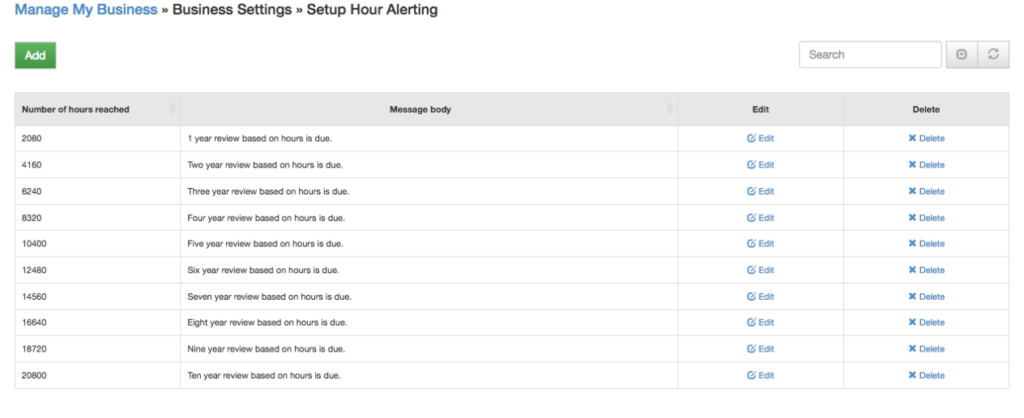
 

Once setup, you can set an employee’s previous hours in their setup:


With that, each day TimeWellScheduled will check approved total hours with your hour alerting values and if they match (or go over), will send an alert to their manager (whomever they report too).


Let’s Work Together!

Don’t waste another minute – Try our 30 day trial.

New Links Panel

We've added a new Links panel to the Dashboard of TimeWellScheduled for common links accessed by staff. To add/remove or edit Links that appear in the panel, got to Manage My Business>>Manage My Links. Select Edit from the dropdown menu beside the link you want...

read more

Scheduling and Time-clock Software for Today’s Needs

Quickly create, edit and oversee scheduling with ease.

No credit card required

Scheduling and Time-clock Software