Platformย ย ย ย ย ย ย Solutionsย ย ย ย ย ย ย Pricing

Workforce Management

๎€ฅ

Scheduling

Create and share schedules in minutes. Reduce overstaffing and ensure you always have the right people on the floor.

๎€ฃ

Absences & Availability

Stop the back-and-forth. Track time-off requests and employee availability in one centralized calendar.

t

Whoโ€™s Working Board

Get a real-time snapshot of your entire operation. Instantly see who is clocked in, whoโ€™s late, and whoโ€™s on break.

Time & Attendance

}

Punch Clock

Secure, user-friendly options to eliminate time theft and human error. Support for web, mobile, and biometric hardware.

๏‹‚

Time Cards

Automated digital time cards that simplify approvals. Spend less time chasing paper and more time growing your business.

๏•ฑ

Payroll Integration

Push accurate data to your payroll provider in clicks, not hours. We play nice with the platforms you already use.

Employee Engagement

๏ƒ€

Team Communication

Keep everyone in the loop with secure group chats and direct messaging. No more missed texts or messy email chains.

๏‡ช

Company News Board

A digital hub for announcements. Ensure every employee sees important updates, safety notices, and company wins.

๎€‹

Employee App

Put the power of TimeWellScheduled in your team’s pocket. Employees can view schedules, swap shifts, and clock in directly from their mobile devices.

Operations & HR

๎‚‹

HR Suite

Centralize employee training, asset tracking, and digital files. Maintain compliance with comprehensive, easy-to-access records.

๏Š

Project Tracking

Monitor labor costs against specific projects or tasks. Gain visibility into equipment usage and real-time productivity.

๎€•

Retail

๏•ข

Hotel

๏‹ง

Restaurant

๏•Ž

Grocery Store

๏ 

Long Term Care

๏‚

Compare Alternatives

TimeWellScheduled may be unresponsive – August 22, 2016

We just got word that googleโ€™s servers (where we host TimeWellScheduled) are down so response times may be delayed.

If you haven’t already , you can turn on TimeWellScheduled’s “Offline mode” to help things run smoother.

Make sure you are using the latest Firefox (version 7 or higher) before setting this up. You can get the latest version here.

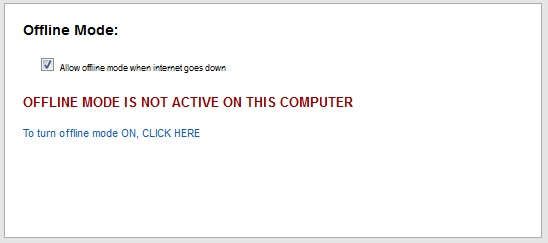
Step 1 โ€“ Go to MANAGE MY BUSINESS->GENERAL SETTINGS and click on โ€˜Allow offline mode when the internet goes downโ€™

a37

Step 2 โ€“ At each computer that will use offline mode, the application needs to download a small amount of information so it can work offline. To do this, go to MANAGE MY BUSINESS->GENERAL SETTINGS and click โ€˜To turn offline mode ON, CLICK HEREโ€™

a38

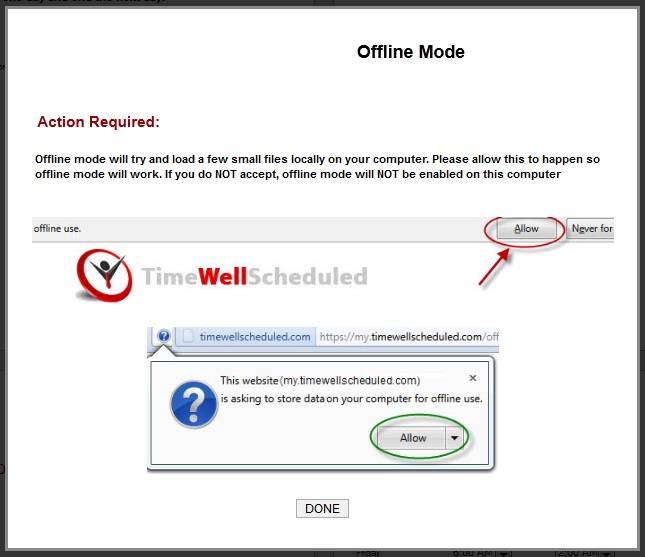
Step 3 โ€“You will see this popup, letting you know what what to do. It is CRITICAL you click ALLOW, if you donโ€™t, offline mode will NOT be setup. Click โ€˜Doneโ€™

a39

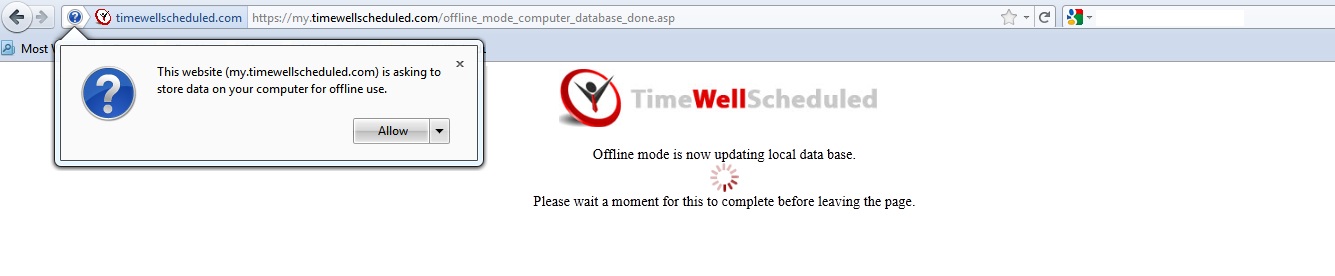
Step 4 โ€“ You will likely see the following message in your browser, click ALLOW

a40

Step 5 โ€“ Depending on your browser settings, you may see this message, click ALLOW as well.
a41

You are all done and the computer you setup is ready to work offline!

If you are on the main punch in page, when the internet goes down, you will see this image at the top, and all you can do is punch in/out. Once the internet comes back up, this message will disappear.

a42

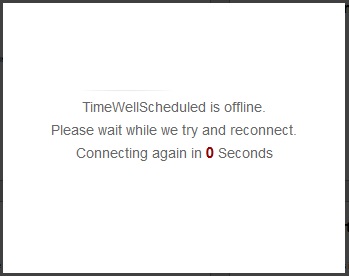
If you are working within the site, you will see this screen โ€“ once the internet comes back up, the message will go away.
a43


Scheduling and Time-clock Software for Todayโ€™s Needs

Quickly create, edit and oversee scheduling with ease.

No credit card required

Scheduling and Time-clock Software