
Platform       Solutions       Pricing

Workforce Management

Scheduling

Create and share schedules in minutes. Reduce overstaffing and ensure you always have the right people on the floor.

Absences & Availability

Stop the back-and-forth. Track time-off requests and employee availability in one centralized calendar.

t

Who’s Working Board

Get a real-time snapshot of your entire operation. Instantly see who is clocked in, who’s late, and who’s on break.

Time & Attendance

}

Punch Clock

Secure, user-friendly options to eliminate time theft and human error. Support for web, mobile, and biometric hardware.

Time Cards

Automated digital time cards that simplify approvals. Spend less time chasing paper and more time growing your business.

Payroll Integration

Push accurate data to your payroll provider in clicks, not hours. We play nice with the platforms you already use.

Employee Engagement

Team Communication

Keep everyone in the loop with secure group chats and direct messaging. No more missed texts or messy email chains.

Company News Board

A digital hub for announcements. Ensure every employee sees important updates, safety notices, and company wins.

Employee App

Put the power of TimeWellScheduled in your team’s pocket. Employees can view schedules, swap shifts, and clock in directly from their mobile devices.

Operations & HR

HR Suite

Centralize employee training, asset tracking, and digital files. Maintain compliance with comprehensive, easy-to-access records.

Project Tracking

Monitor labor costs against specific projects or tasks. Gain visibility into equipment usage and real-time productivity.

Retail

Hotel

Restaurant

Grocery Store

Long Term Care

As an owner or manager, how can I get the same alerts my supervisors get when an employee is late?

March 19, 2013

This is managed under the ROLES. Go to Manage My Business » Business Settings » Manage Roles and select a role to edit.

You will see a drop list ‘Secondary Notification’, in there you can pick your role.
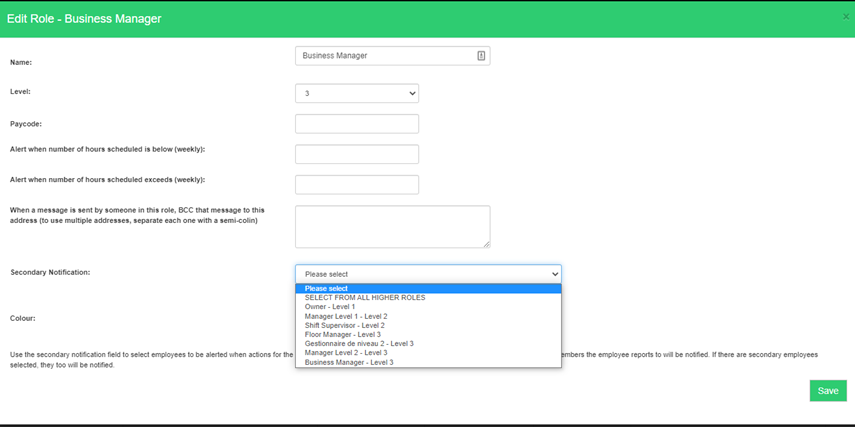
Once saved, any notifications sent to the role you just edited will also be sent to you.

Let’s Work Together!

Don’t waste another minute – Try our 30 day trial.

Adding Drag and Drop Shifts

You can add common shift times easily by creating Timebands which will appear at the top of the schedule.  Just Drag and Drop the new button into the schedule to add the new shift.   To create a new Timeband click on the “+” button in the blue header section at...

read more

Sometimes I see negative hours, why is that?

This can happen in very specific cases, when you allow shift splitting and employees can clock in early. In normal cases, here is how a shift split works. Employee Scheduled - 12PM to 8PM Employee leaves at 3PM, arrives back at 5PM We calculate the schedule as 2...

read more

Scheduling and Time-clock Software for Today’s Needs

Quickly create, edit and oversee scheduling with ease.

No credit card required

Scheduling and Time-clock Software